
Stages
A stage is one step of the work on a task, such as writing a spec or implementing code. Every task goes through a pipeline of stages. For each stage, Natamux starts the work, checks the result, and waits for your approval when the stage asks for it.
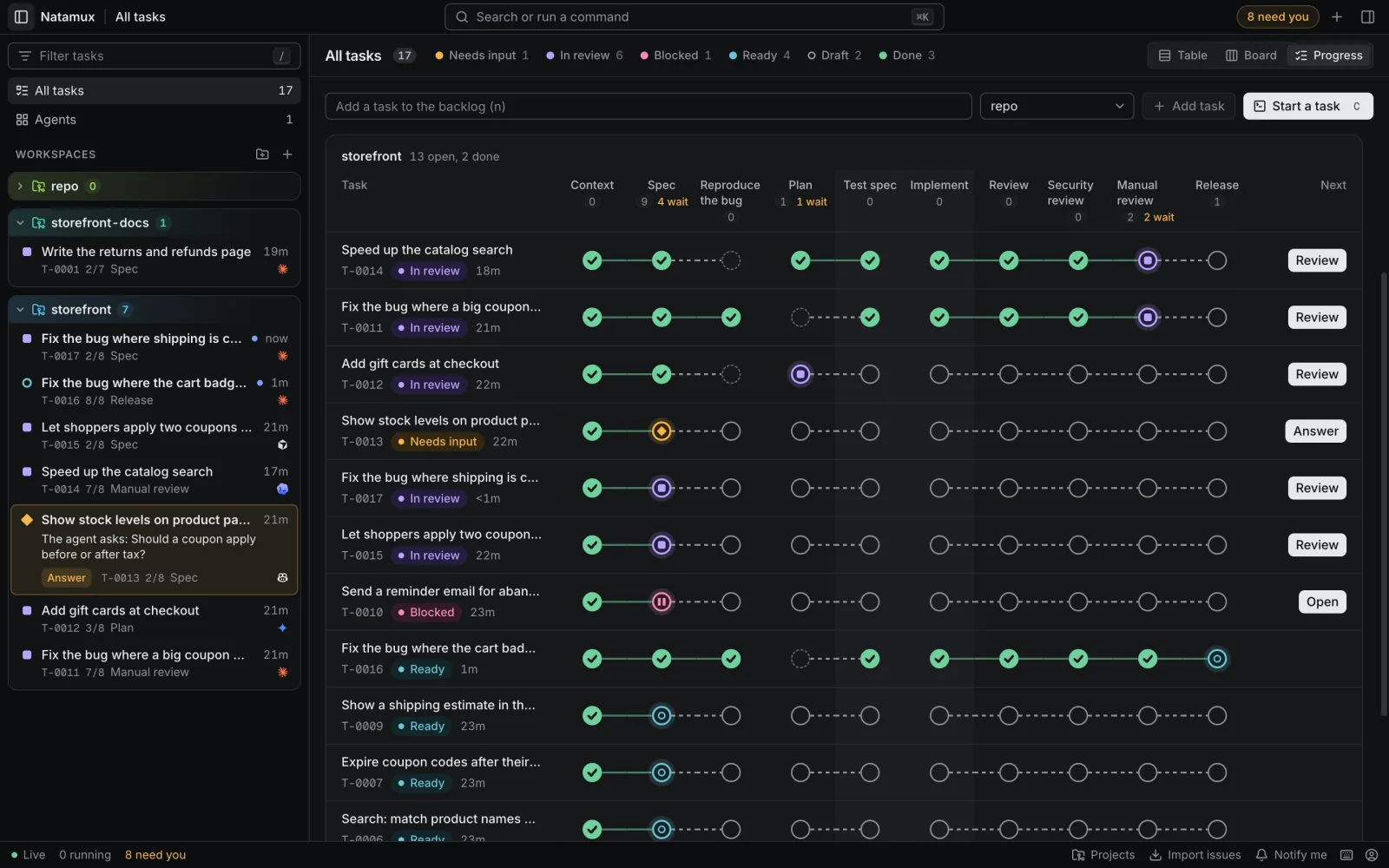
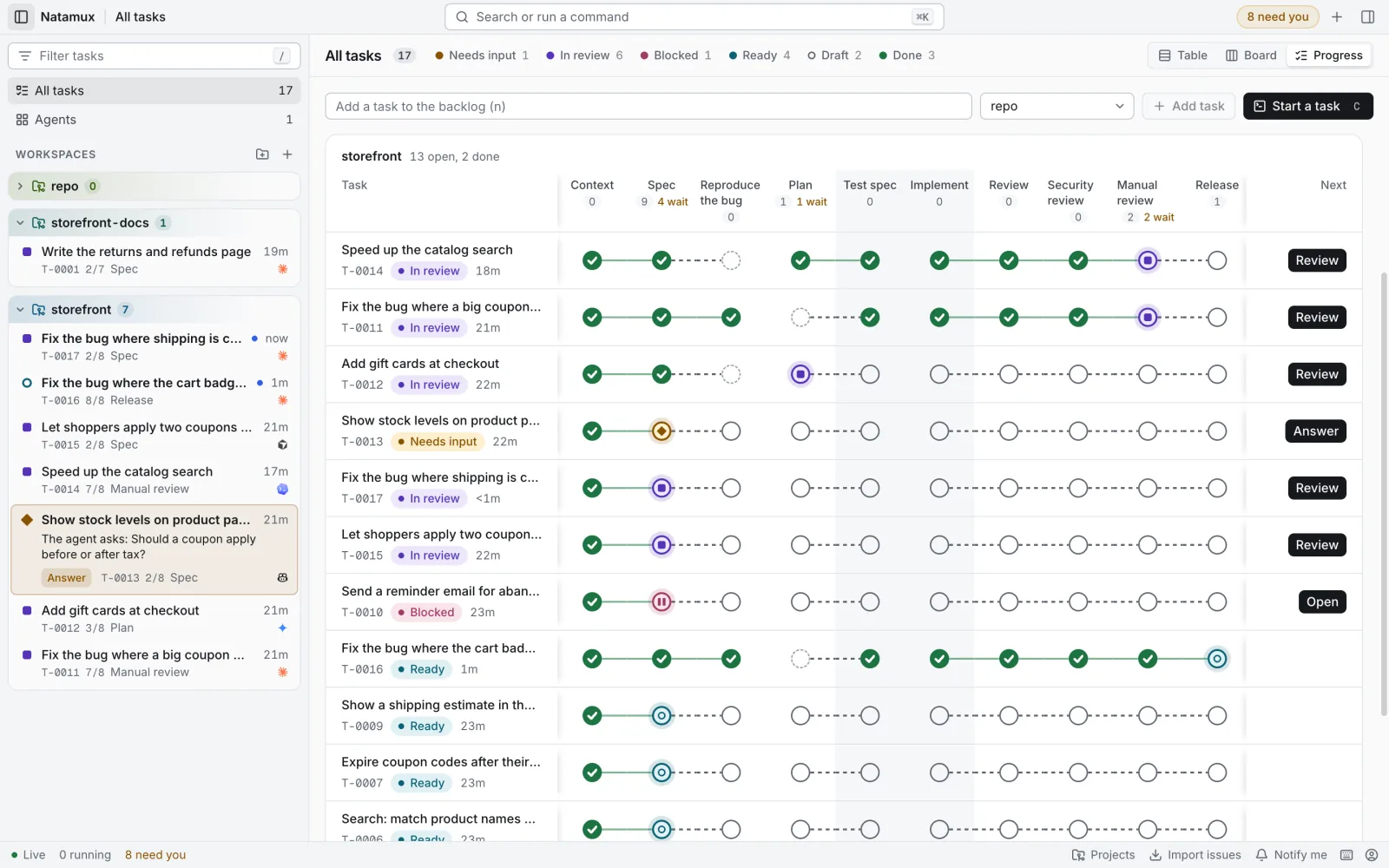
For the default pipeline at work, with two agents side by side and a review agent that sends the task back, see The review loop.
The default pipeline
Section titled “The default pipeline”A project without a .natamux.json file uses this pipeline:
Context → Spec → Plan → [ Test spec ‖ Implement ] → Automated tests → Review → Release| Stage | Kind | Gate | What happens |
|---|---|---|---|
| Context | context |
manual | Natamux collects what the task is about into context.md. |
| Spec | agent |
manual | The agent writes spec.md, with a Code map of the files and functions to change. It does not change code. |
| Plan | agent |
manual | The agent writes plan.md. It does not change code. |
| Test spec and Implement | group | Two stages run side by side, see below. | |
| Automated tests | testing |
auto | The agent adds a test for each case of the test spec, runs all tests and fixes failures. It does not commit. |
| Review | agent |
auto | An agent in its own shell reviews the changes against the spec and writes review.md. When something must be fixed, it sends the task back to Implement by itself. See Review by an agent. |
| Release | release |
manual | The task finishes when its pull request is merged. |
The group in the middle holds two stages:
| Stage | Kind | Gate | What happens |
|---|---|---|---|
| Test spec | agent |
manual | An agent writes test-spec.md with a Cases section. It does not read the code. |
| Implement | agent |
auto | The agent writes tests and code. It does not commit: you read the changes in the Changes tab and commit them. |
To change the pipeline, use Project settings or see the configuration reference. The catalog also has Manual review, where you read the diff and approve it, and Manual testing, where a person tries the change. They are not in the default pipeline, so no person has to act between Plan and Release.
Shells and agents
Section titled “Shells and agents”The default pipeline runs three agents. All are the task’s agent unless a stage names its own.
| Stage | Shell | Agent |
|---|---|---|
| Context | none, or Shell 1 for a skill or mcp source |
none, or agent A |
| Spec, Plan | Shell 1 | Agent A. Each stage’s prompt goes into the same session. |
| Implement | Shell 1 | Agent A, same session |
| Test spec | Shell 2 | Agent B, a new session. It can be another agent, see Choose a model; then it gets a shell of its own. |
| Automated tests | Shell 1 | Agent A, same session. With a command: a new shell and no agent. |
| Review | Shell 5 | Agent C, a new session, so it reads the work with fresh eyes. It can be another agent; then it gets a shell of its own. A later round goes into the same session. |
| Release | none | none |
One session for the stages in a row keeps the agent’s context and its prompt cache, so it does not read the code again. Run with a workflow on Implement adds sub-agents inside Claude Code.
Choose a model
Section titled “Choose a model”Natamux uses the model each agent picks. Set it in one of these places:
| Where | Counts for | Example |
|---|---|---|
| The agent’s own settings | Every session of that agent | Claude Code: "model": "opus" in ~/.claude/settings.json. Codex: model = "…" in ~/.codex/config.toml. |
NATAMUX_<AGENT>_ARGS |
Every agent Natamux starts | NATAMUX_CLAUDE_ARGS="--model opus". See Environment variables. |
The stage’s args |
One stage that runs beside the stage in Shell 1, or one stage of your own | { "id": "test-spec", …, "agent": "codex", "args": "--model gpt-5" }, or Agent and Arguments in the stage settings |
A catalog stage in Shell 1 cannot change the model: that would need a new session and lose the context of the stages before it.
A stage of your own (made with Custom stage) that an agent works on can change it too, also where it would run in Shell 1.
A stage with its own agent or arguments runs in a shell of its own: Shell 6 for the first such stage of the pipeline, Shell 7 for the next, and so on. Natamux closes no agent while the task runs, unless a stage asks for it (see End a stage’s shell), so Shell 1 keeps the task’s agent and its session. When such a stage runs again, for example after a send back, its prompt goes into the agent in its shell, which still has the context of the last round. All shells of a task close when the task is done or cancelled.
A task keeps the list of stage ids it had when it was created. A later change to .natamux.json changes the settings of those stages (name, gate, prompt, checks), not the list of stages of existing tasks.
Change the pipeline
Section titled “Change the pipeline”Open the menu of a project and click Settings. The Stages tab edits the pipeline of the project. Save writes it to .natamux.json in the repository. Commit the file to share it. The JSON tab edits the whole file as text. See Project settings.
- Pick stages. Add stage opens the catalog: common work steps such as Research, Security review or Manual testing, grouped by phase. Custom stage makes a stage of your own. The reference lists every catalog stage.
- Order and switch. Drag a stage, or use Move up and Move down. The checkbox of a stage turns it on or off. A stage that is off stays in the file with its prompt and approval, but new tasks do not get it.
- Run side by side. Run alongside the stage above puts an
agentormanualstage in a group with the stage above it. Run on its own takes it out. - Approval. Wait for my approval sets the gate. Every stage has a default. The screen says Default or Changed, and Use default goes back. A
reviewormanualstage is always a check by a person, so its box is checked and locked. On thereleasestage the box reads Open the pull request when I click. - Agent. A stage that runs beside the stage in Shell 1, such as Test spec, or a stage of your own, can start another agent: pick it in Agent, and add words such as
--model sonnetin Arguments. See Choose a model. - Workflow. On an
agentstage, Tasks can run it as a workflow gives each task a checkbox to run the stage as a workflow. See Run a stage as a workflow. - Prompt. An agent or testing stage shows its default prompt. Edit it to make a prompt of your own. The chips
{title},{description},{dir}and{ref}insert placeholders, and Insert skill inserts{skill:<name>}. A prompt of your own gets no commit rule: say whether the agent commits. - Preview. A flow chart on top shows the pipeline as you edit it. A person icon marks a stage that waits for approval. A pencil marks a prompt of your own. Click a node to select its stage.
New tasks use the new pipeline. Tasks on their way keep their stages, but use the new prompts and approvals.
Skills in a prompt
Section titled “Skills in a prompt”A prompt can name a skill with {skill:<name>}. A skill of a plugin is <plugin>:<skill>. The task can run with any agent, and each agent calls skills its own way, so Natamux fills the placeholder when the stage starts:
- The agent has the skill and a sure way to call it: Natamux writes that call. It is
/namefor Claude Code and Copilot CLI, and$namefor Codex. Gemini CLI and Cursor CLI have no sure call, so they always get rule 2. - Otherwise, a
SKILL.mdof that name exists for any agent: Natamux writesthe skill in <path> (read that file and follow it). Natamux looks in the task’s worktree, then in your main checkout. A new worktree does not have your untracked files, such as.claude/settings.local.jsonthat turns a plugin on, so a skill found only in the main checkout always gets this form. - Otherwise Natamux writes
the <name> skill, and the stage card says “The skill<name>was not found for<agent>.” The stage still starts.
Each form reads well in a sentence such as “Use {skill:review-pr} on the diff”. For where each agent keeps its skills, see the page of the agent, for example Claude Code.
Stage kinds
Section titled “Stage kinds”| Kind | Who works | When the stage finishes |
|---|---|---|
context |
Natamux, or an agent for a skill or MCP source | The context file is written. |
agent |
An agent in the task shell | The agent runs natamux done and the checks pass. |
review |
You | You approve. |
testing |
An agent, or a command if the stage has one | With a command: the command exits with 0. Without: the agent runs natamux done and the checks pass. |
release |
Your git host | The pull request is merged. |
manual |
You | You approve. Use it for a step that Natamux cannot do, such as a sign-off. |
A review or manual stage waits for you at once (state review). Other stages start in state ready and start working.
The gate decides what happens after a stage passes its checks.
| Gate | Behavior |
|---|---|
auto |
The task goes on to the next stage. |
manual |
The task waits in state review until you approve it. |
Checks
Section titled “Checks”When an agent runs natamux done (or you press Mark as done), Natamux runs the checks of the stage. A stage can have these checks:
| Check | Setting | Passes when |
|---|---|---|
| Output file | output |
The file exists in .natamux-task/, is not empty, and was changed after the stage started. |
| Sections | sections |
The file has a heading for each name. Case does not matter, and any heading level counts. |
| Cases | sections includes Cases |
The Cases section has at least one case: a sub-heading, or a list item at the left edge when there are no sub-headings. |
| New commit | requireCommit |
There is at least one commit since the stage started. |
| Clean worktree | requireClean |
No file is left uncommitted. |
| Command | check |
The shell command exits with 0. It runs in the worktree and gets 10 minutes. |
Natamux runs the output and git checks first. It runs the check command only when those pass. requireCommit and requireClean fail for a task that has no workspace.
The default pipeline has no commit check, so agents leave their changes uncommitted. Set requireCommit on a stage to make its agent commit: the default prompt then asks for a commit instead.
Stage files are Markdown files in the .natamux-task/ folder of the worktree. They are named like spec.md and can be up to 1 MB. Natamux keeps git from tracking them. See Workspaces.
Progress
Section titled “Progress”A task in a workspace shows its stages in the Progress view of the details panel, beside the terminal. The panel is open by default beside a workspace. Use the palette command Show the task progress, or the link /w/<id>/progress, to open it on Progress. The progress view lists the checks that passed under Show evidence, and the reasons for those that failed.
The Docs tab
Section titled “The Docs tab”The Docs tab of a workspace (key 4) lists the stage files of the task, such as context.md, spec.md and plan.md, with the time each changed. You can read them and fix them by hand before you approve a stage.
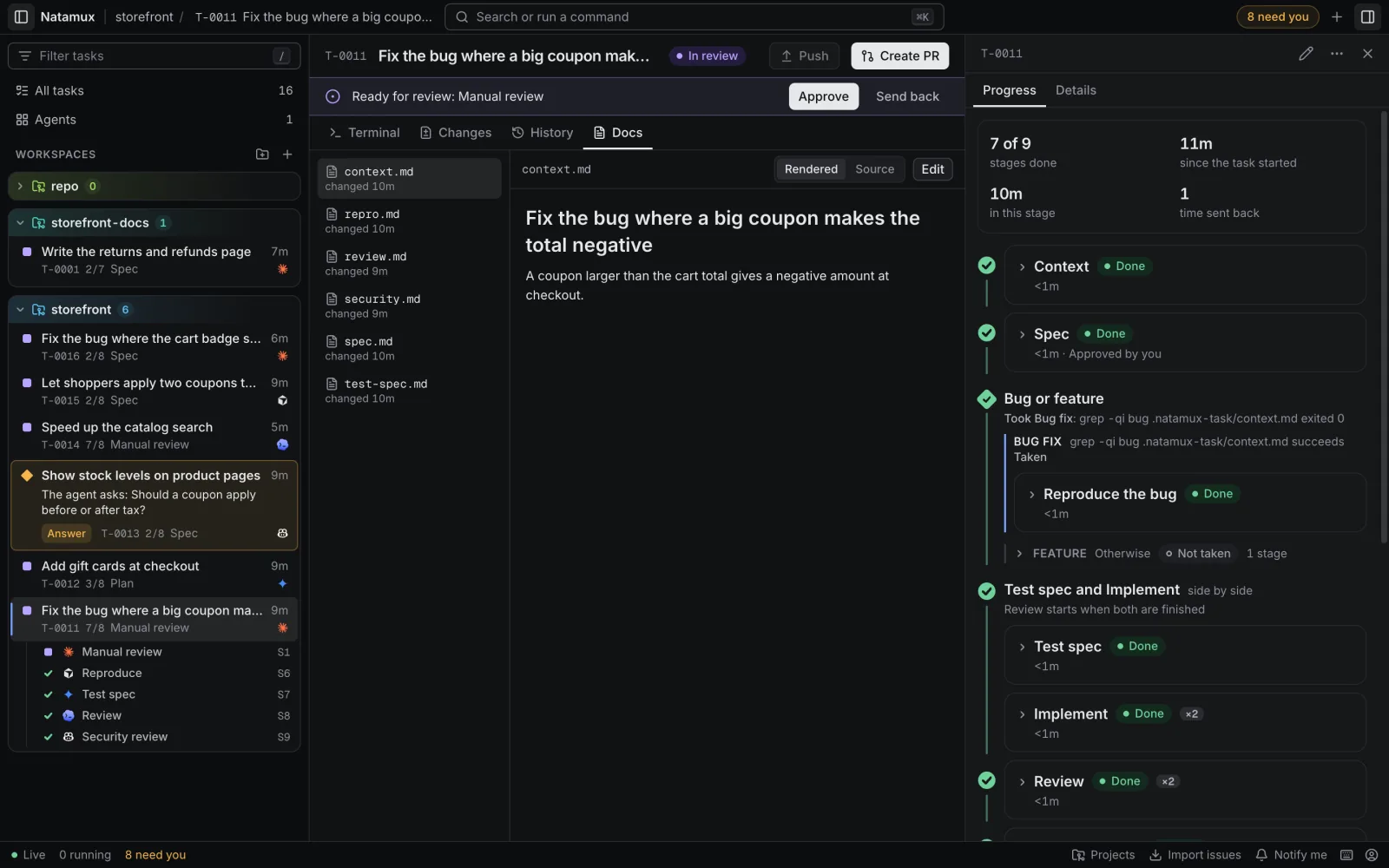
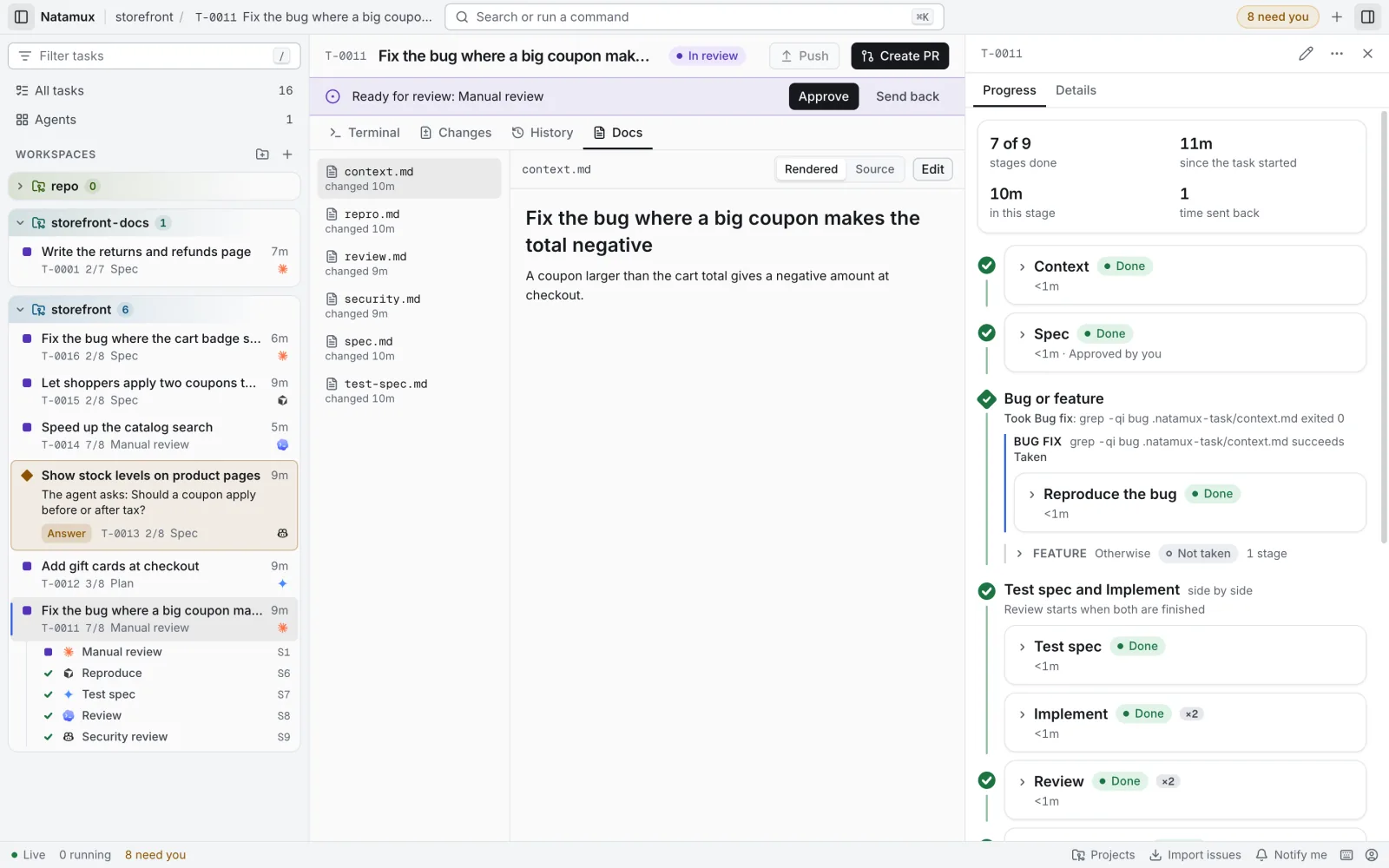
- Rendered shows Markdown as formatted text. Source shows the raw text. Natamux remembers your choice in this browser.
- Click Edit to change a file, then Save. If the file changed after you began, Natamux asks before it replaces the new text. Your unsaved edit stays when you switch to another file or tab.
- A task with no stage file shows Write context.md to start the first one.
- Attachments lists the files attached to the task. An image opens in the tab; any other file downloads.
- HTML in a file is not shown. Images are not loaded; the alt text shows instead. Only
http,httpsandmailtolinks open, in your browser. Other links show as plain text.
What happens when a check fails
Section titled “What happens when a check fails”- The first time, the stage stays
running. Natamux types the reasons into the agent terminal and asks the agent to fix them and runnatamux doneagain. - If the checks fail again, the task goes to
needs-inputand waits for you. - Then you can fix the problem and press Mark as done to check again, send the task back, or press Approve anyway.
A stage that no agent works on, such as a context stage, waits for you at the first failure.
If a stage cannot start, for example when the issue for a GitHub context cannot be read, the task goes to needs-input and the reason is in the progress view.
What natamux done does
Section titled “What natamux done does”An agent runs natamux done in the task shell when its stage is finished. The command:
- reports that the stage of this shell is done
- makes the daemon run the checks of the stage
- uses
NATAMUX_TASK_IDandNATAMUX_TERMINAL, which Natamux sets in task shells
natamux donenatamux done --task T-0001 --stage implementUse --stage only when two stages run side by side and Natamux cannot tell which one you mean.
natamux done in the shell of a stage that does not run now is refused, for example from Review after it sent the task back. Implement stays running until its own agent reports. Every stage prompt ends with the line When you are done, run natamux done, unless the steps above say not to.
The turn end that follows natamux done does not count as “stopped early”.
Control a stage by hand
Section titled “Control a stage by hand”| Action | Dashboard | CLI |
|---|---|---|
| Approve | Approve, or Approve anyway when the checks failed | natamux stage approve T-0001 |
| Send back | Send back | natamux stage back T-0001 --to spec --reason "..." |
| Skip | Skip | natamux stage skip T-0001 |
| Start | Start | natamux stage start T-0001 |
| Mark as done | Mark as done | natamux done --task T-0001 |
| Pass or fail | natamux stage pass T-0001, natamux stage fail T-0001 |
The buttons are in the stage card in the Progress view of the details, beside the workspace, so you can approve while you read the diff. When the stage waits for you, the card also says why, with Answer in terminal and Resume. With the details closed, click the state of the task in the workspace header (In review, Needs input or Failed) to open them at the current stage. On a phone, a banner under the header shows Ready for review with Approve and Send back.
Add --stage <id> when two stages run side by side.
Send a stage back
Section titled “Send a stage back”Sending back starts a stage again. You can go back to the current stage or to an earlier one.
--to <id>names the stage. Without it, Natamux goes back to the last agent stage before the current one.--reasonis added to the prompt of the agent asWhat to change: ....- Requesting changes in a review, or typing a prompt to the agent during a review stage, also sends the task back.
- After a send back to an earlier stage, the task goes through the stages after it again.
- An agent sends a task back from its prompt. Tell it to run
natamux stage back $NATAMUX_TASK_ID --to implement --reason "..."when it finds a problem, and then to stop without runningnatamux done.
See the worked examples in Build a workflow, such as a CI watcher that sends the task back on a failed check.
Skip a stage
Section titled “Skip a stage”Skipping ends a stage without checks and moves the task on. If you skip the last stage, the task is done.
You can also skip a stage before the task gets there. In Progress, a stage that has not started has Skip. The card then says Will be skipped, and the task skips the stage when it reaches it. Don’t skip takes the mark off.
- The mark stays after a send back: the task skips the stage again on its way forward.
- If you send the task back to the marked stage itself, the stage runs.
Pass and fail
Section titled “Pass and fail”natamux stage pass and natamux stage fail set the result of a stage by hand. Natamux uses them itself for a testing stage with a command: when the command ends, the shell reports the result.
Run a stage as a workflow
Section titled “Run a stage as a workflow”A stage can run as a workflow: Claude Code splits the work across several sub-agents and checks the result before it finishes. The result is more accurate, but the stage uses many more tokens. Use it for hard stages, such as Plan or Implement.
- Project settings decide which stages offer it. Open the project settings, click an
agentstage, and tick Tasks can run it as a workflow. This writes"workflow": trueon the stage in.natamux.json. The default pipeline offers it on Plan and Implement. - On each task, the card of such a stage in the Progress view has a Run with a workflow checkbox. It is off by default. Tick it before the stage starts; Implement starts by itself once Plan is approved.
- When the stage starts, Natamux adds a line to its prompt that asks the agent for a workflow (with the keyword
ultracode). This happens each time the stage starts, also after Send back. The prompt with failed checks does not get the line. - A change while the stage runs does not reach the agent. It counts the next time the stage starts.
- Only Claude Code runs workflows. For a task with another agent, the checkbox cannot be ticked.
- While the workflow works in the background, the stage stays running, with “Waiting for workflow: …” as its summary.
- A finished stage that ran as a workflow shows a Workflow label.
From the CLI:
natamux stage workflow T-0001 on --stage implementReview by an agent
Section titled “Review by an agent”The Review stage is an agent stage that runs in its own shell ("ownShell": true), apart from the agent that wrote the code.
- It reads
spec.mdandtest-spec.md, then the changes (git status,git diffand the changed files). It does not change code. - It writes
review.mdwith a Findings section. - Nothing to fix: it runs
natamux done, and the task goes on. - Something to fix: it runs
natamux stage backwith the problems as the reason. Implement starts again with “What to change: …” in its prompt, then Automated tests and Review run again. - An agent may send the task back from its stage 2 times, over the life of the task. The third time the stage waits for you (“needs input”), so two agents that disagree do not loop. You can always send it back yourself.
- Pick another agent or model for it in Agent and Arguments of its stage settings.
For a review by a person, add Manual review from the catalog, for example after Review. The whole loop, with screenshots and the limits, is on The review loop.
Stages in their own shell
Section titled “Stages in their own shell”A stage that only writes a report can run in its own shell with a new session: "ownShell": true in .natamux.json. The catalog sets it on Review, Test spec, Security review, Performance check and Accessibility check. Such a stage runs in Shell 5, and a turn of its agent does not touch the session in Shell 1. With its own agent or arguments, it runs in a shell of its own instead, from Shell 6; see Choose a model.
End a stage’s shell
Section titled “End a stage’s shell”Check End the agent and close its shell when the stage is done in the stage settings ("endShell": true) to free the memory of a stage once it is done. It is off by default, and only for context, agent and testing stages outside Shell 1.
- Done means the stage passed, was approved or was skipped, or sent the task back to an earlier stage. A stage that waits for your approval keeps its shell until you approve.
- Without the setting, Natamux does not close the stage’s shell while the task runs.
- Natamux ends the agent or command in the stage’s shell and closes the shell. Other shells go on.
- Shell 1 is never closed, because it keeps the task’s agent and its session. A stage there shows “This stage runs in Shell 1, which cannot be closed.” in place of the checkbox, and
"endShell": trueon it is ignored. - A next stage in the same shell starts a new agent with a new session and the full stage prompt.
- A send back to the stage starts a new agent in its shell.
- The last stage is left to the end of the task, which keeps the last screen of each shell. A shell closed earlier keeps no screen.
Check a stage on CI
Section titled “Check a stage on CI”A stage that changes code (an agent stage without an output file) or a testing stage can wait for your CI before it passes. This tests the work on CI when it cannot run on your machine, and sends the agent the error instead of a guess.
- Project settings decide which stages offer it: tick Tasks can check it on CI on the stage, or write
"ci": truein.natamux.json. The default pipeline offers it on Implement and Automated tests. - On each task, the card of such a stage has a Check on CI checkbox. It is off by default, because it pushes the work to your remote.
- When the agent runs
natamux doneand the other checks pass, Natamux:- makes a commit of the worktree as it is, without changing your branch, your index or your files. It holds every file that git does not ignore, also new files you did not add, so keep secrets such as
.envin ignored files; - force-pushes it to
natamux-ci/<task branch>onorigin; - waits for the CI runs of that commit with
gh run list, for up to 30 minutes. The card says Checking on CI with the branch.
- makes a commit of the worktree as it is, without changing your branch, your index or your files. It holds every file that git does not ignore, also new files you did not add, so keep secrets such as
- Every run passes: the stage passes, and its checks list each run.
- A run fails: the stage goes back to its agent, as a send back from a review does. The agent gets the stage prompt again, with the failed runs and the end of each failed log (
gh run view --log-failed), and the prompt is sent at once. The card says only Sent back by CI N×; point at it to see the failed runs. After two such send backs, the next failure waits for you, and the card lists the failed runs with a view run link each. - A run fails on a testing stage: the task goes back to the stage before it that changes code, such as Implement, with the failed runs. Its agent fixes them, and the testing stage runs again. After two such send backs, the next failure waits for you.
- No run starts within 3 minutes, CI takes more than 30 minutes, or the push or
ghfails: the stage waits for you, with the reason. - When the task is done or cancelled, Natamux deletes the
natamux-ci/branch.
Your CI workflows must run on a push to these branches, for example in GitHub Actions:
on: push: branches: [main, 'natamux-ci/**']It needs the GitHub CLI (gh), signed in, as for pull requests.
From the CLI:
natamux stage ci T-0001 on --stage implementStages that run side by side
Section titled “Stages that run side by side”A group holds 2 to 4 stages that are on and work at the same time. Only agent and manual stages can be in a group.
- The group finishes when every stage in it is done.
- Each stage works in its own shell. The stage that changes code (an agent stage without an output file) keeps the first shell.
- A stage in another shell can start another agent, with words of its own: set Agent and Arguments in its settings (
agentandargsin the file). - The state of the group is the most urgent state of its stages:
needs-input,failed,blocked,review,running,ready,draft, in that order.
Paths with a condition
Section titled “Paths with a condition”A branch splits the pipeline into 2 to 4 paths. Each path has a condition and its own stages. When the task gets to the branch, Natamux checks the conditions in order. The task takes the first path that holds, runs its stages one after another, and then goes on to the step after the branch. The stages of the other paths never run for that task. Build a workflow has a solo and a team example with branch paths.
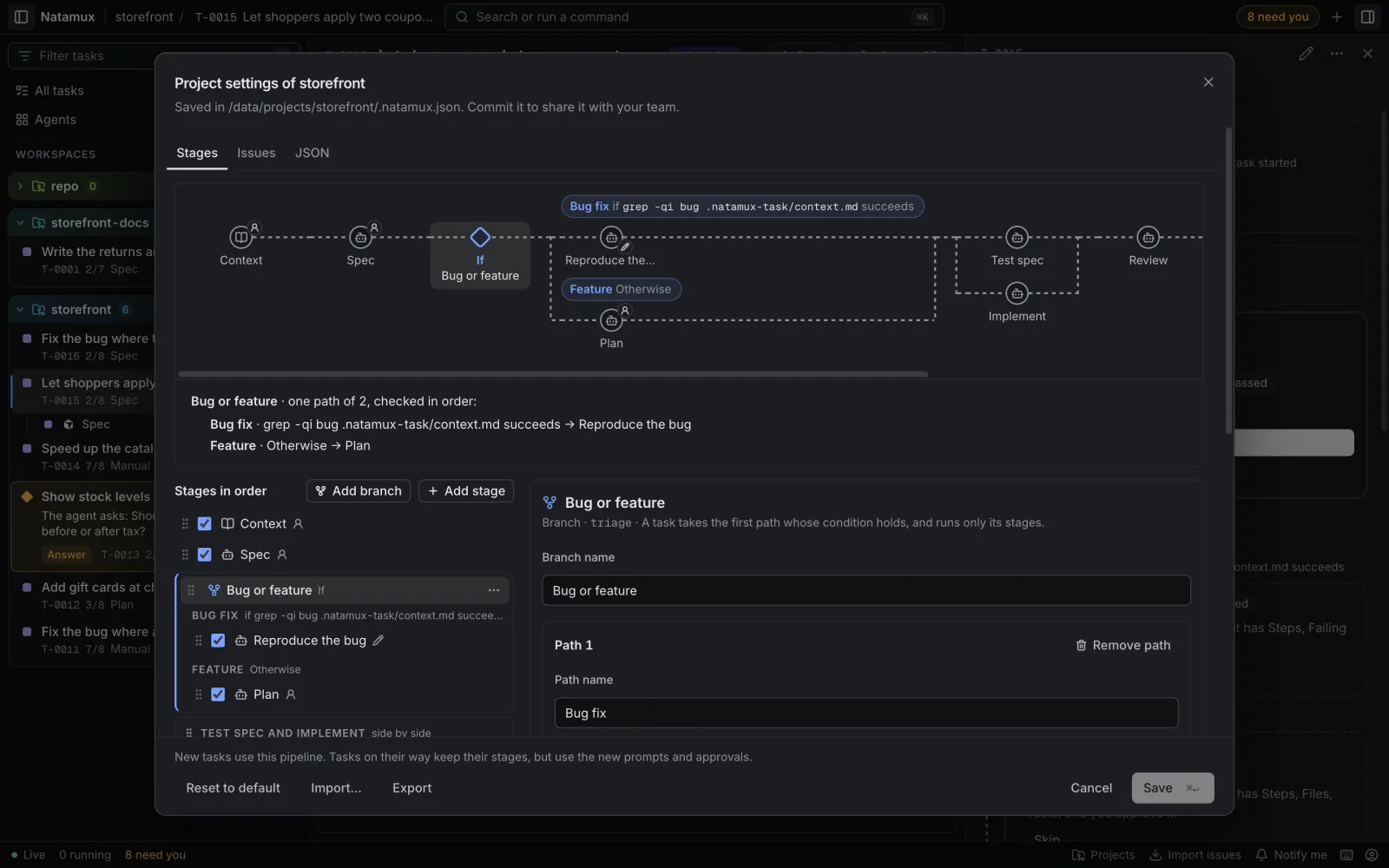
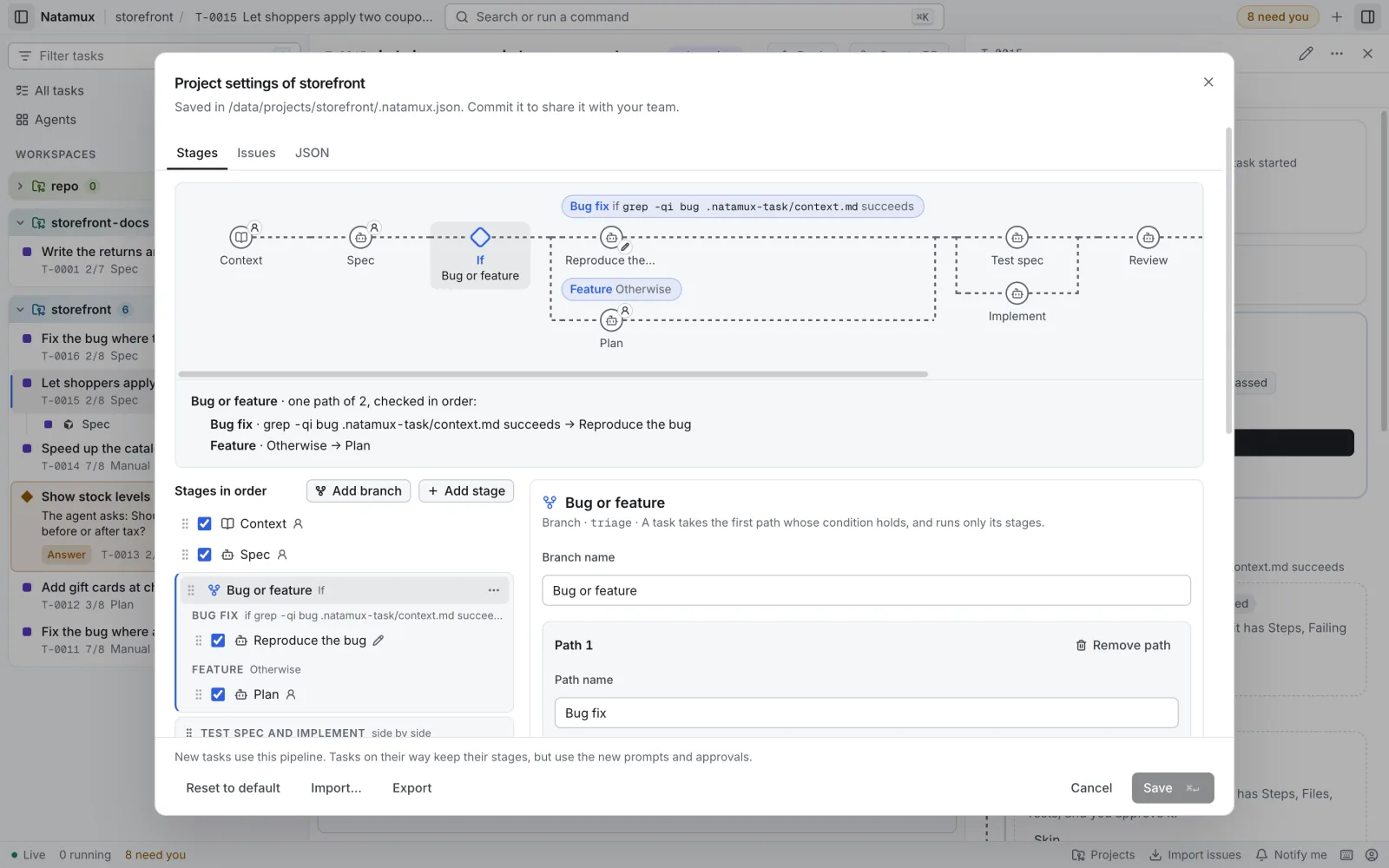
For example, after Plan: a small change goes the Implement way, and a change that needs a review goes the Review PR way.
{ "id": "after-plan", "name": "After plan", "paths": [ { "id": "small", "name": "Small change", "when": { "type": "output", "file": "plan.md", "section": "Size", "contains": "small" }, "stages": [ { "id": "implement", "kind": "agent", "gate": "auto" }, { "id": "testing", "kind": "testing", "gate": "auto" } ] }, { "id": "pr-review", "name": "Review PR", "when": { "type": "command", "run": "test -f .no-review" }, "not": true, "stages": [{ "id": "review", "kind": "review", "gate": "manual" }] } ]}If plan.md has “small” under ## Size, the task goes Implement, Testing, and then on. Review never starts. If not, and .no-review does not exist, it goes the Review PR way and never starts Implement or Testing.
Conditions
Section titled “Conditions”| Type | Holds when |
|---|---|
output |
The file in the task’s stage folder has the text. file is a markdown file name. With section, only the lines under that heading count. The match ignores case |
command |
The command exits with 0. It runs in the worktree (the task folder without one), with the shell of your system, and stops after 10 minutes |
"not": trueturns a condition around: the path is taken when it does not hold.- The last path can leave out
when. It is the Otherwise path, taken when no other path holds. - No path holds and there is no Otherwise path: the task skips the branch.
- A missing file, a command that fails to start, and a command that times out all mean “does not hold”. The stage before the branch still ends as usual.
- The check happens when the stage before the branch ends. For a stage that waits for your approval, that is when you approve, so your edits to its files count.
Build a branch in Project settings
Section titled “Build a branch in Project settings”- Open Project settings → Stages and pick the step the branch comes after.
- Click Add branch. Give it a Branch name.
- In each path card, set the Path name, the condition (File has text or Command succeeds, holds or does not hold), and add stages from the list.
- Add path adds a path (up to 4). Make this the Otherwise path is on the last path.
The chart shows the branch as an If node with one lane per path, each with its condition, and a dashed line for the skip when there is no Otherwise path. Command conditions are listed in the notice before you save, like other commands.
Natamux shows an error on the branch and keeps Save off when:
- a path has no stage, or a path that is not the last has no condition;
- a path holds a group, another branch, a context stage or a release stage;
- the branch is the first step, or comes right after another branch (put a stage between them);
- a file name is not a markdown file, or a text or command is empty;
- a branch has only one path left with a condition: turn on a stage in another path, or remove the branch.
Stage ids are unique in the whole pipeline, so each stage is on exactly one path.
In the Progress view
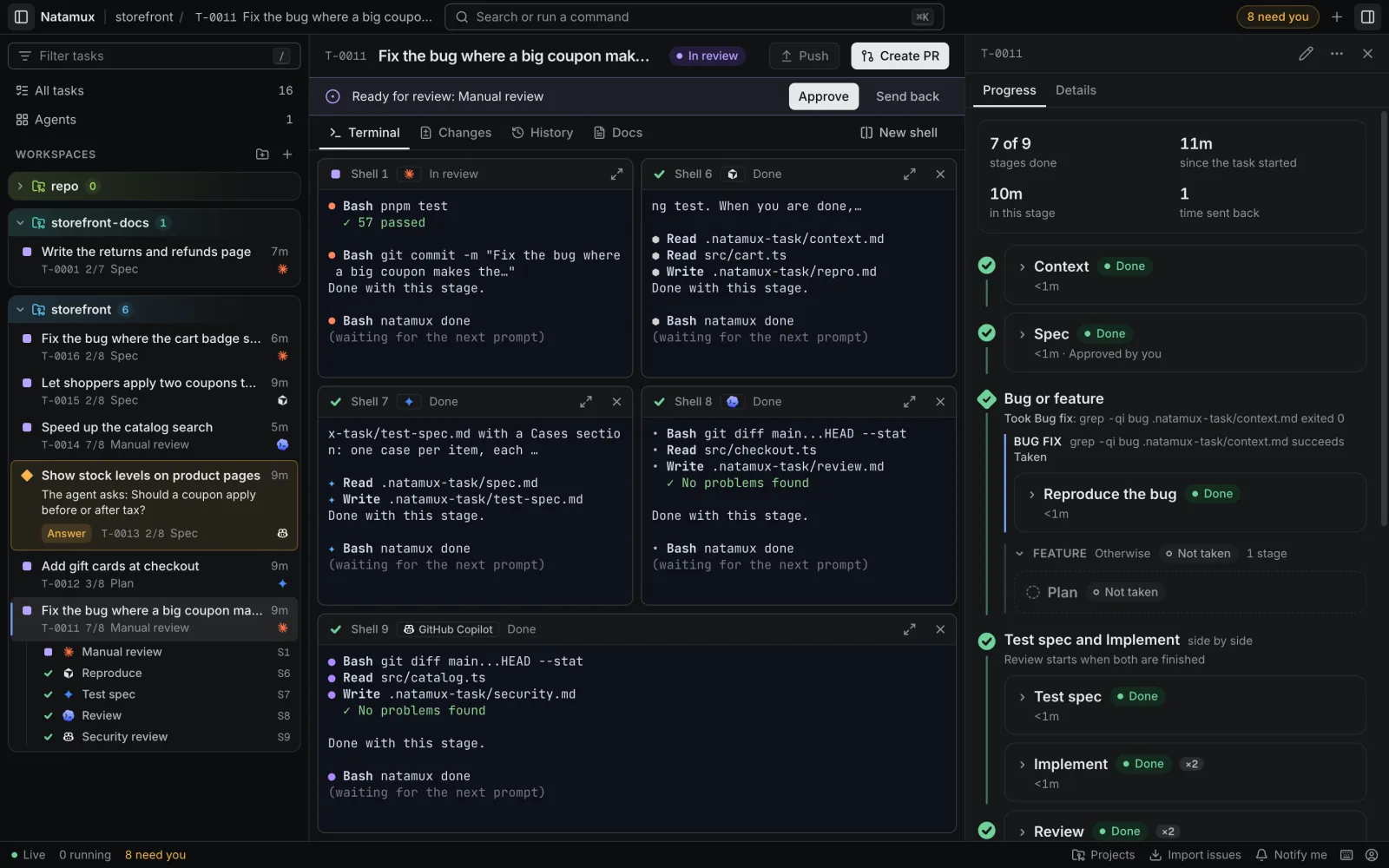
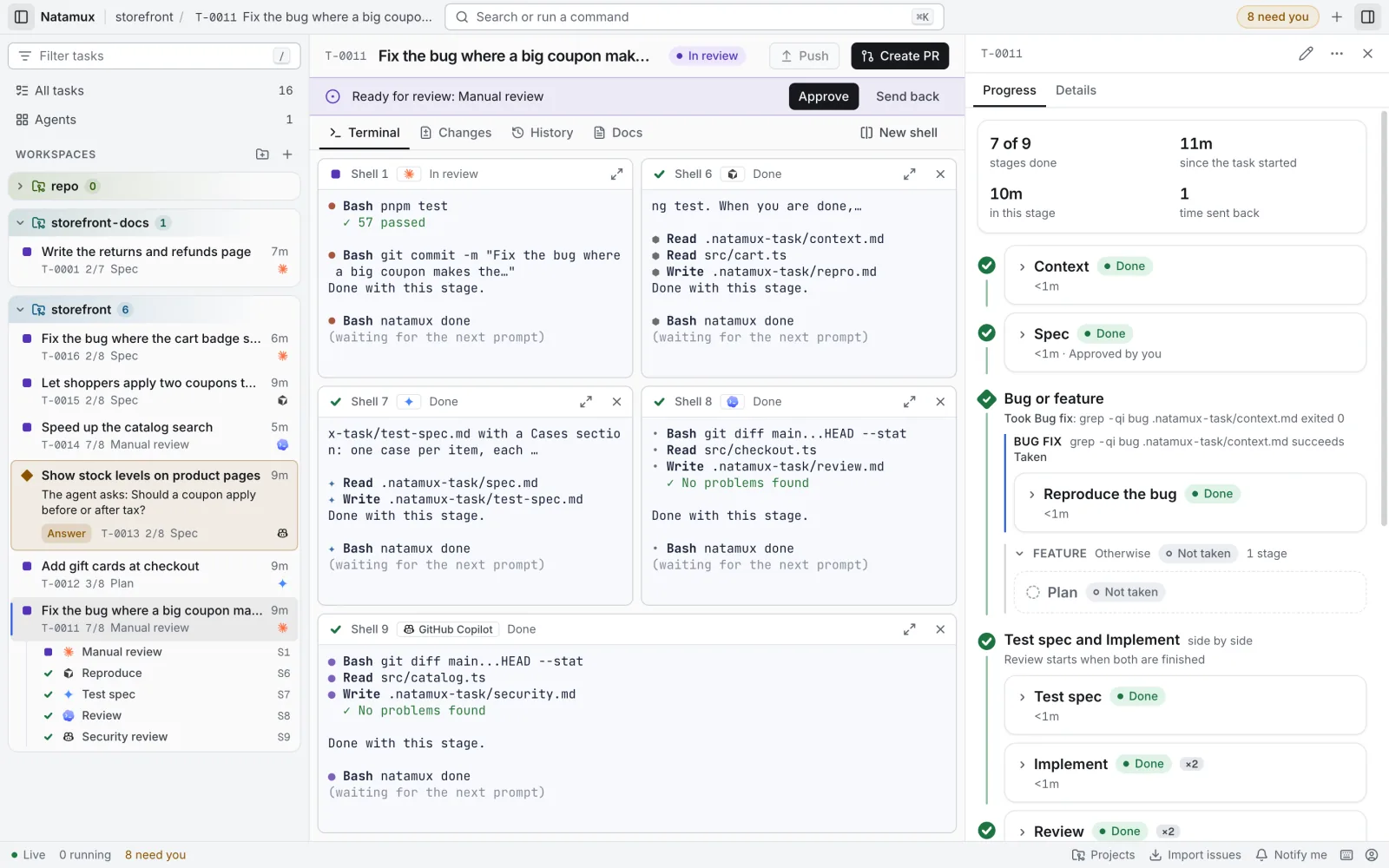
Section titled “In the Progress view”The branch says Took Small change and the reason, such as plan.md "Size" contains "small". Each other path is one folded row marked Not taken. Click it to see its stages. They do not count in “3 of 7”. The timeline adds the path name to the event that chose it.
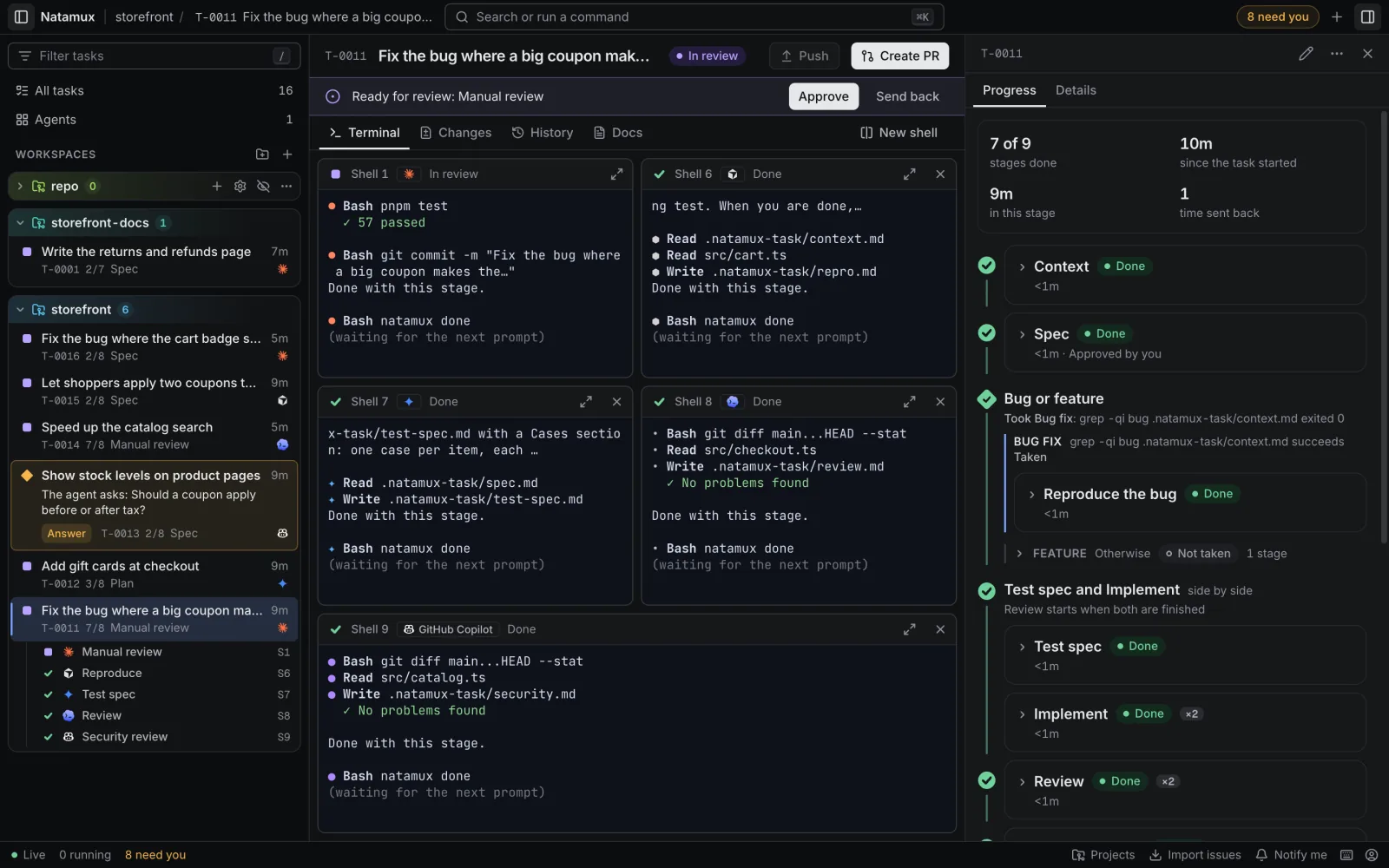
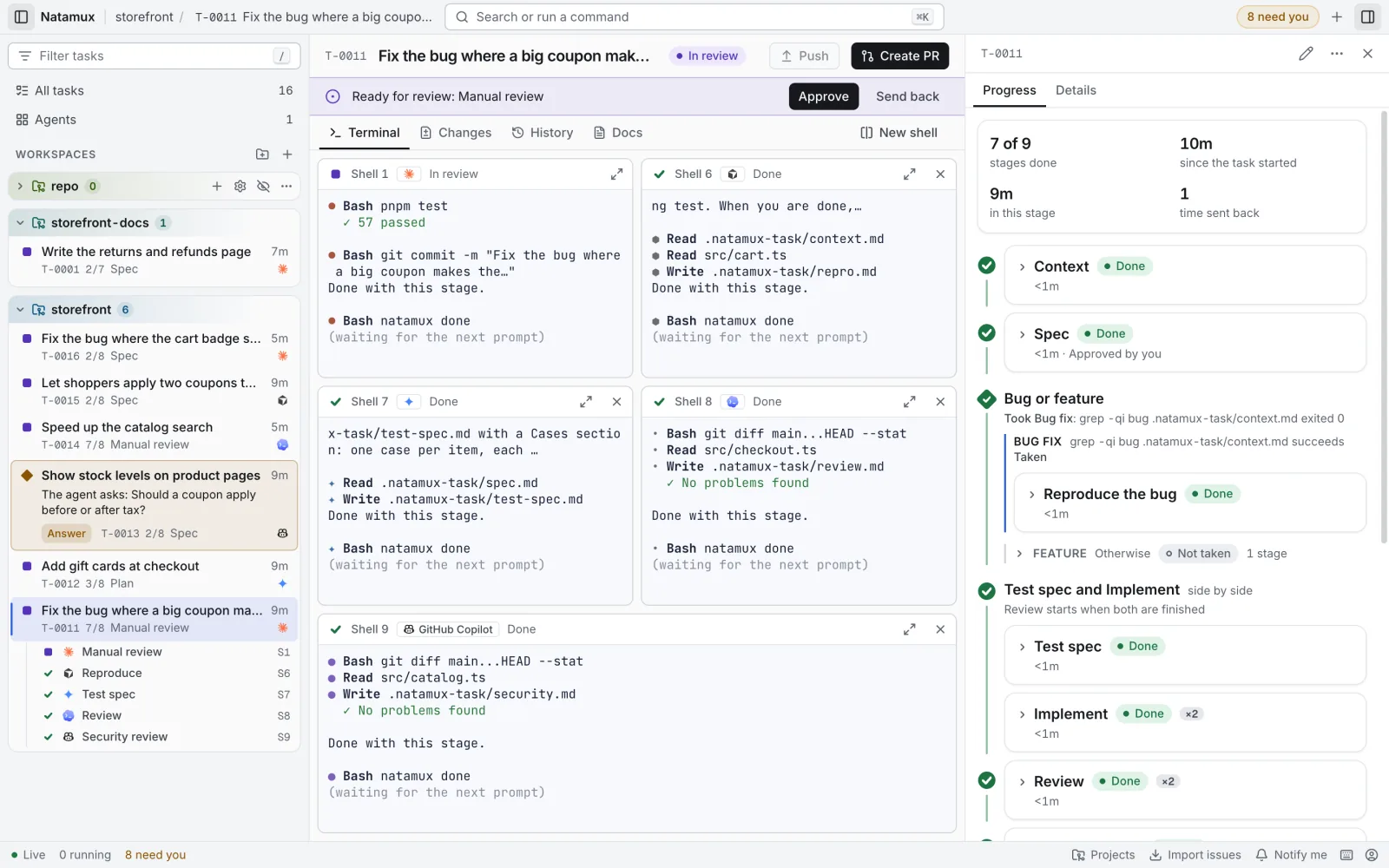
Send back
Section titled “Send back”- You can send a task back to a stage of the path it took, or to a stage before the branch. A stage of a path not taken is refused.
- Without
--to, Natamux goes back to the last agent stage on the way the task went. - A send back to a stage before the branch clears the choice. The conditions are checked again when the task gets to the branch.
A task keeps the paths it was made with. If you change the branch later, a path the task does not have is passed over.
Testing with a command
Section titled “Testing with a command”A testing stage with a command runs it in a shell. Without a command, an agent does the testing.
{ "id": "testing", "kind": "testing", "gate": "auto", "command": "pnpm test" }If the daemon stops while the command runs, it runs the command again when it starts. If the command exits with 0, the stage passes. Any other exit code fails the stage and the task is failed. To run it again, retry the task, then start the stage:
natamux event T-0001 task.retriednatamux stage start T-0001Context sources
Section titled “Context sources”The first stage of the default pipeline reads the context of the task. The source decides where the text comes from. Pick it when you create the task, for example natamux task create "Fix login" --context github-issue:42.
| Source | What Natamux does |
|---|---|
manual |
Writes the title, notes and reference of the task into context.md. The stage passes by itself, so a new task does not wait for you. |
github-issue |
Reads the issue with the gh CLI (title, body, labels, comments) into context.md, and links the issue to the task. Needs a reference such as #42, owner/name#42 or an issue address. |
skill |
An agent runs a skill and writes context.md. Pick the skill in the dialog, or configure it. Natamux names the skill the way the agent of the task needs, with the rules in Skills in a prompt. |
mcp |
An agent runs a prompt you configured and writes context.md. |
For github-issue, gh must be installed and logged in. See GitHub. Configure the sources in context.sources; see the configuration reference.
Natamux starts the context stage as soon as you create the task. The other stages start when the task reaches them, or when you start them.
Context from a skill
Section titled “Context from a skill”Use a skill when the context lives in another application, for example a record in a ticket tracker. The skill reads the record, by itself or through an MCP server the agent has.
- In Start a task, set Context from to An agent skill. It shows when an agent has at least one skill.
- Click Pick a skill and choose the skill.
- Enter the key or address of the record in Reference.
- Choose an agent. No agent, a plain shell cannot run a skill.
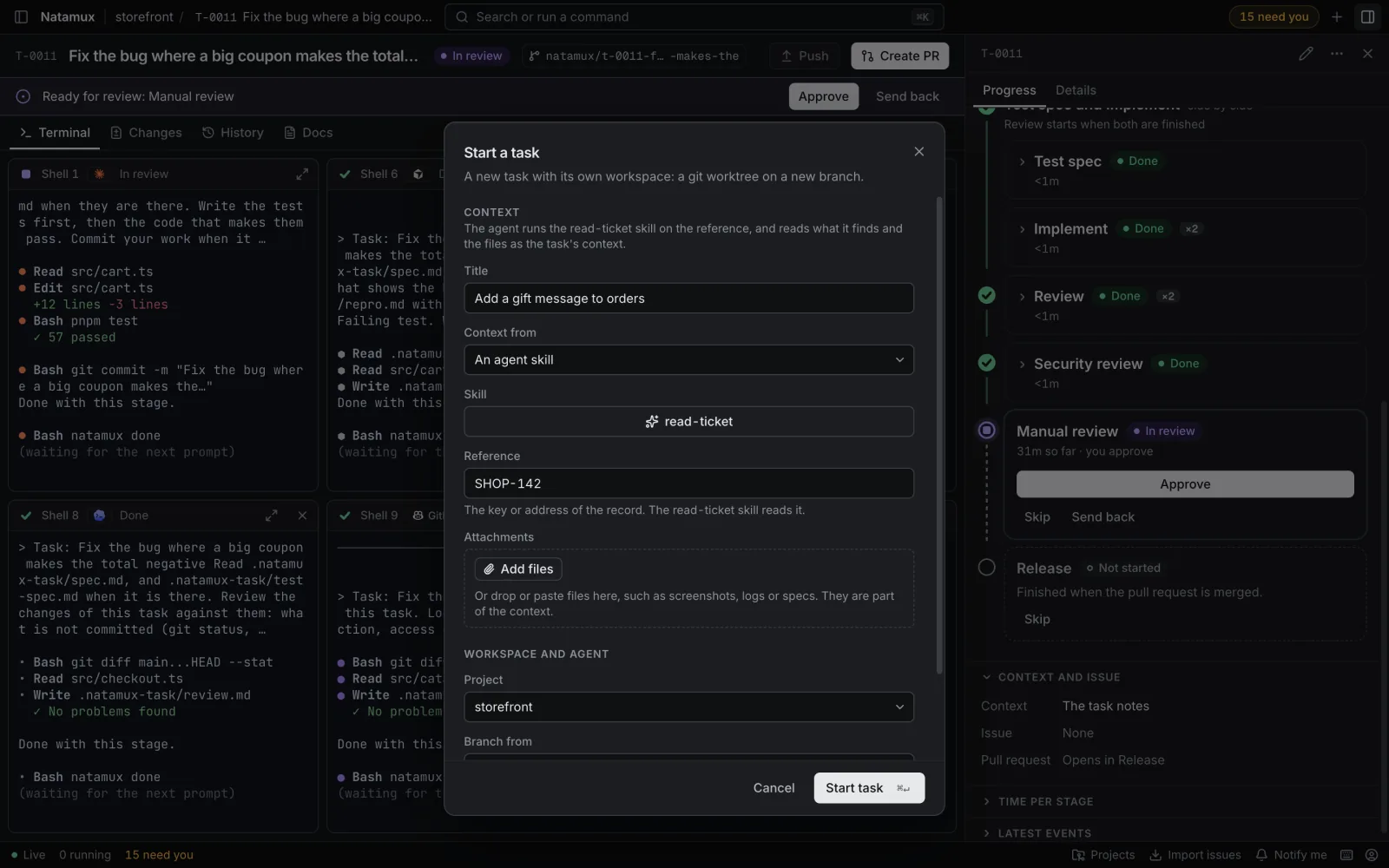
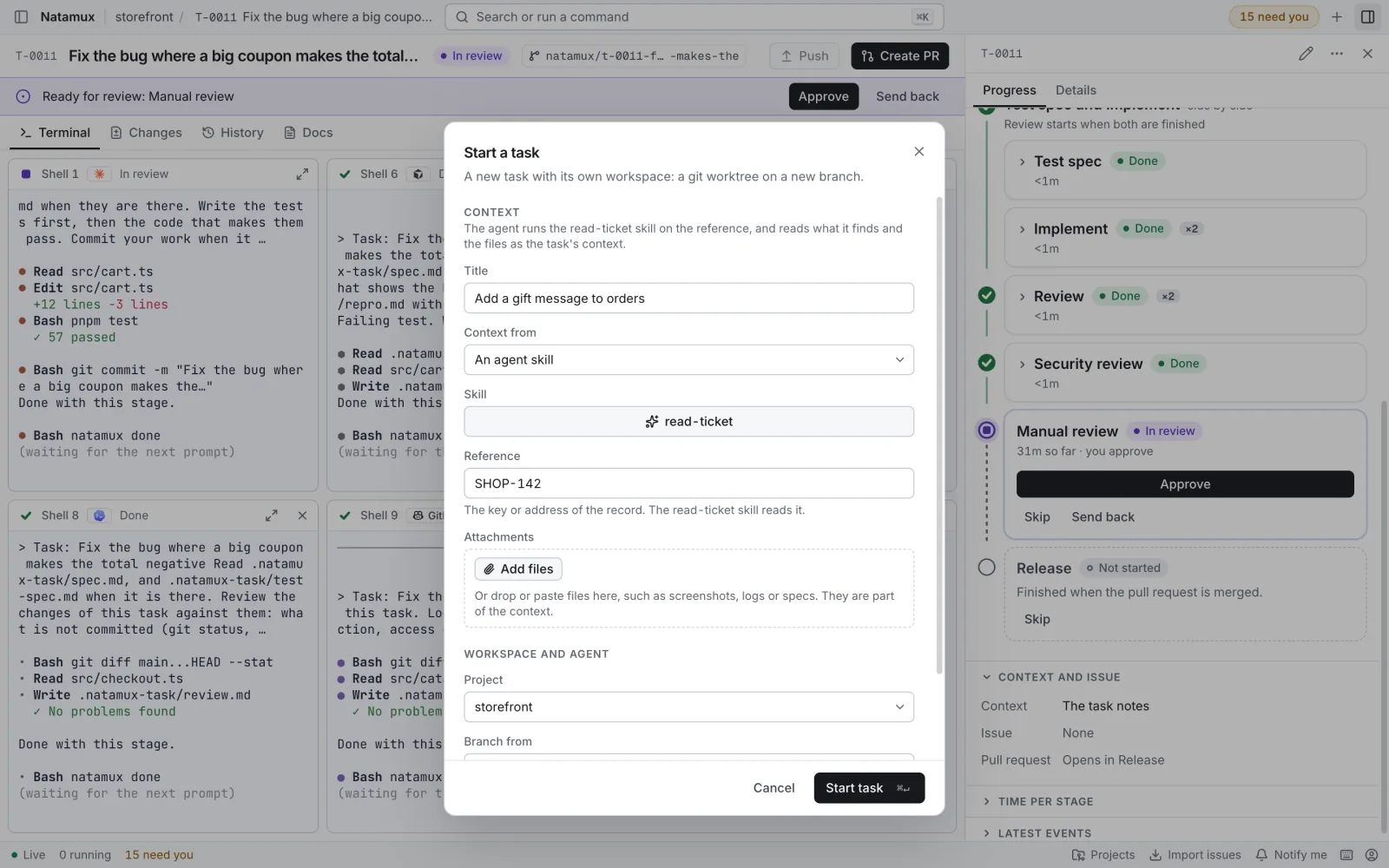
The context stage starts the agent with the skill and the reference, for example /read-record ABC-1 for Claude Code. The agent writes what it finds to context.md and runs natamux done. No entry in .natamux.json is needed. Natamux does not install skills or MCP servers: the agent uses what it has.
Attachments
Section titled “Attachments”You can attach files to a new task: documents such as Word, Excel, PDF or Markdown files, and images such as screenshots. In the Start a task dialog, click Add files, drop files on the dialog, or paste a screenshot. From the CLI, use natamux task create "Fix login" --attach error.png.
- A task takes at most 20 files, 20 MB each and 50 MB together.
- Natamux keeps the files with the task and copies them to
.natamux-task/attachments/in its worktree. Git ignores the folder, so the files never reach a commit. context.mdgets an Attachments section with the path of each file, so the agent of each stage finds them. With askillormcpsource, the agent is asked to list them; Natamux adds the section if it does not.- Natamux does not convert the files. The agent reads them with its own tools, so whether it can read a Word or Excel file depends on the agent.
- The files stay on your machine. They are not sent to the issue tracker.
Related
Section titled “Related”- Tasks: the states a stage can be in
- Agents and hooks: how agents start and report
- Build a workflow: worked examples with paths and send back
- Mix agents in one task: an agent and model per stage
- Configuration: the
.natamux.jsonfile